


A cloud security audit can miss critical exposure if it examines your environment but not your provider’s security posture. A cloud security audit checklist should cover governance, policies, access controls, shared responsibilities, cloud configurations, and provider security evidence. Together, these checks clarify who is responsible for each safeguard and whether controls work across the cloud environment.
It’s easy to focus on what your team controls and assume the provider’s assurances fill the gaps. A sound review makes both sides of that boundary visible, so you can address unclear ownership and weak controls before they become operational risks.
This guide explains what a cloud security audit covers and how to assess policies, access, shared responsibility, and provider security. It highlights the evidence to review, including audit reports, configuration monitoring, incident response, and data protection. Use the checklist to organize a practical review around your environment, obligations, and highest-priority controls.
Key Takeaways
- Assess governance, compliance alignment, and cloud configurations together to uncover gaps that a narrow technical review can miss.
- Clarify which security responsibilities belong to your organization and which belong to the cloud provider, then connect each to a control owner.
- Review identity permissions, authentication, and credential handling to reduce unnecessary access across users, roles, and services.
- Use provider audit evidence alongside infrastructure configuration reviews to build a clearer picture of cloud security posture.
What is a Cloud Security Audit?
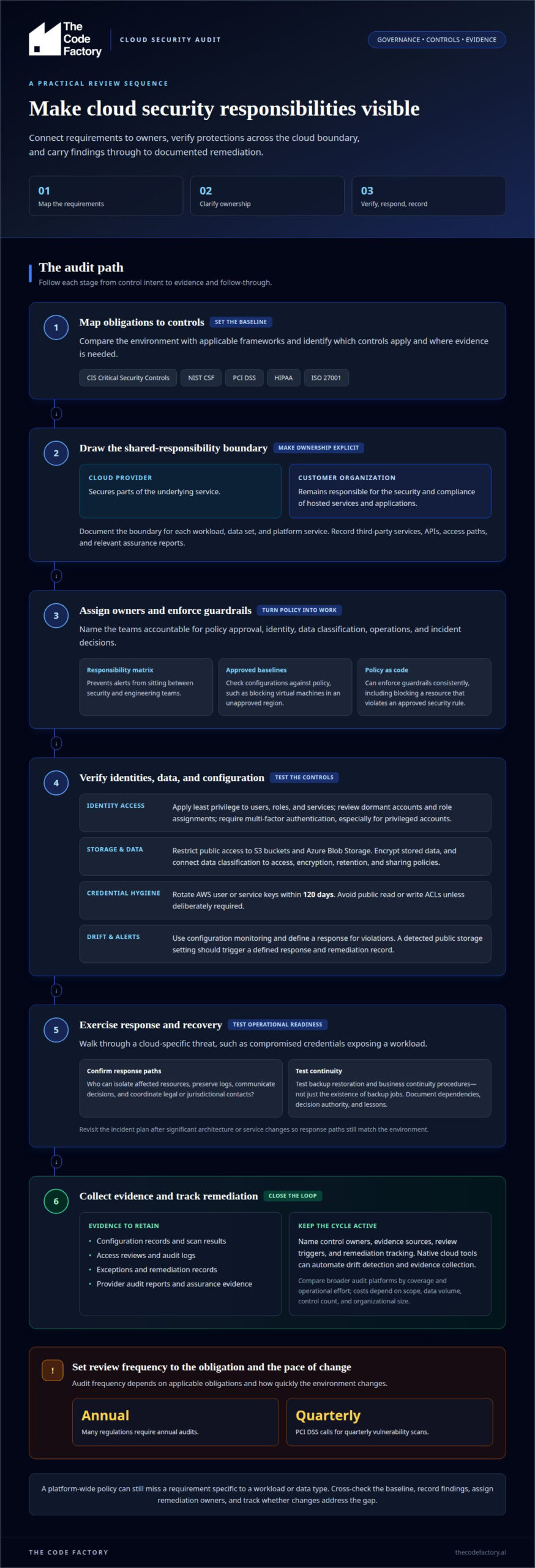
A cloud security audit evaluates whether governance, policies, and technical controls protect cloud resources and support compliance. A practical cloud security audit checklist links each requirement to an owner, supporting evidence, and a remediation step. It also examines third-party risk, since poorly understood provider controls and customer responsibilities can leave gaps.
- Map requirements to controls. Compare the environment with applicable frameworks, such as CIS Critical Security Controls, NIST CSF, PCI DSS, HIPAA, or ISO 27001. This mapping shows which controls apply and where evidence is needed.
- Test configuration against policy. Review whether resources follow approved baselines. For example, a policy can block virtual machines in an unapproved region, while encryption requirements protect stored data.
- Review vendors and connections. Record third-party services, APIs, access paths, and relevant assurance reports. This helps expose dependencies that could affect compliance or widen privilege.
- Define responses to violations. Configure event-driven alerts or actions for non-compliant resources. A detected public storage setting, for example, should trigger a defined response and remediation record.
Native cloud configuration and policy tools can automate drift detection and evidence collection. Broader audit platforms may consolidate reporting and workflows. Compare tools by coverage and operational effort, since costs depend on scope, data volume, control count, and organizational size.
Audit frequency depends on applicable obligations and how quickly the environment changes. Many regulations require annual audits, while PCI DSS calls for quarterly vulnerability scans. Evidence may include configuration records, access reviews, audit logs, scan results, exceptions, and remediation records.
Set an audit policy that names control owners, evidence sources, review triggers, and remediation tracking. Cross-check the baseline against applicable standards: a platform-wide policy can still miss a requirement specific to a workload or data type.
Cloud policies, governance, and shared responsibility
Governance turns cloud security goals into assigned work. Check whether the strategy, roadmap, policies, and incident procedures reflect the actual environment. The shared responsibility model is central: providers secure parts of the underlying service, while customers remain responsible for the security and compliance of their hosted services and applications. Document this boundary for each workload, data set, and platform service.
- Assign accountable owners. Name the teams responsible for policy approval, identity, data classification, operations, and incident decisions. A responsibility matrix helps prevent an alert from sitting between security and engineering teams.
- Review the roadmap and guardrails. Record how governance priorities translate into implementation steps, then assess how changes are approved. Policy as code can enforce guardrails consistently, such as preventing deployment when a resource violates an approved security rule.
- Classify data and connect protections. Label sensitive information, then link each classification to access, encryption, retention, and sharing policies. This makes it easier to detect when a storage or application configuration conflicts with the data’s required handling.
- Test incident response. Walk through a cloud-specific threat scenario, such as compromised credentials exposing a workload. Confirm who can isolate affected resources, preserve logs, communicate decisions, and coordinate legal or jurisdictional contacts.
- Exercise continuity and recovery. Test backup restoration and business continuity procedures, not just the existence of backup jobs. Document recovery steps, dependencies, decision authority, and lessons from each simulation.
A policy document alone cannot show whether teams can respond under pressure. Walkthroughs, simulations, and red-team exercises can reveal gaps between written responsibilities and operational readiness. Record findings, assign remediation owners, and track whether changes reduce vulnerabilities or improve detection. Revisit the incident plan after significant architecture or service changes to ensure response paths still match the environment.
Where governance exposes inconsistent guardrails or unclear infrastructure boundaries, cloud infrastructure configuration can help align deployed resources with documented security expectations.
Identity and access management
Identity and access management connects users, services, and applications to cloud resources. Review each identity’s permissions against its current function, then remove access that is no longer needed. Least privilege limits exposure if an account or service credential is compromised. Role-based access control also makes permissions easier to review than scattered individual grants.
- Apply least privilege to users, roles, and services. Remove permissions that exceed documented duties, and review dormant accounts and role assignments. This reduces unnecessary access across the infrastructure.
- Require multi-factor authentication. Enable it for all accounts, especially privileged accounts. A password alone should not provide the only barrier to administrative access.
- Review storage permissions and encryption. Restrict public access to S3 buckets and Azure Blob Storage. Encrypt S3 data, for example with SSE-KMS, and avoid public read or write ACLs unless deliberately required.
- Rotate AWS user or service keys within 120 days. Track key ownership and remove credentials that are no longer needed. Monitor repositories and logs to identify exposed secrets, keys, or credentials.
- Protect access records. Store CloudTrail logs in a secure S3 bucket, restrict who can modify them, and retain logging that supports investigation and access reviews.
To audit network security, review security groups, firewalls, and network access control lists for unnecessary inbound and outbound traffic. Check for public exposure, including Remote Desktop on port 3389, and review AWS network rules at least once a quarter. Virtual private clouds and microsegmentation can help isolate resources and limit lateral movement.
Common risks include excessive permissions, public storage, exposed credentials, and overly broad network rules. Cross-check configuration findings against access records and monitoring data to identify the affected application, understand its exposure, and document remediation clearly.
Cloud service provider security posture
A provider’s assurance report describes specific controls, not the security of every workload in your cloud environment. Assess provider evidence against the services you use, your data, and your shared responsibility boundaries. This distinction matters: a provider’s physical security controls do not establish that your application permissions or configurations are secure.
- Request relevant independent audit reports. Review provider reports such as SOC 2 or PCI DSS evidence, then note their scope, covered services, and assessment period. Compare those controls with your own requirements.
- Examine cloud-specific assurance evidence. The CSA STAR Level 1 self-assessment uses the CAIQ, a yes-or-no questionnaire aligned with the Cloud Controls Matrix. Treat it as documented information about controls, not proof that your own configuration is compliant.
- Map responsibilities to controls. For each service, record which security practices the provider manages and which remain yours. Include access management, workload protection, storage, incident handling, and configuration responsibilities.
- Check resource visibility and change monitoring. Confirm that your assessment can identify existing and deleted resources. Enable logging and monitoring for configuration changes so unexpected drift can be investigated.
To audit vulnerabilities, scan cloud resources and applications regularly, review infrastructure-as-code templates for misconfigurations, and track patching in remediation records. Compare deployed settings with the approved baseline. Configuration drift occurs when live resources no longer match it.
Provider evidence should also cover incident management, storage security, network security, and workload protection. Review how the provider reports incidents and communicates relevant control changes. Link each finding to an internal owner, evidence source, and remediation action. This makes gaps between provider assurances and customer-operated controls visible, rather than treating a certification as proof that the entire stack is covered.
For a structured review of cloud configuration and security controls, request cloud infrastructure configuration support.
The Code Factory: Cloud infrastructure configuration
The Code Factory addresses cloud security findings through cloud infrastructure configuration. This work is a fit when audit results reveal configuration gaps, unclear control implementation, or infrastructure that no longer aligns with security requirements.
For broader production concerns, a production readiness review can assess whether the system is prepared for operational demands. Architecture and scalability consulting can address structural constraints, while code remediation and optimisation target issues within the codebase. Choose the next step based on where the audit identifies risk: infrastructure settings, application code, or system architecture.
Bring your audit findings and the affected system context to The Code Factory. Contact the team to discuss the engineering work needed to address them.
Turn audit findings into lasting controls
An audit creates value when its findings guide the next engineering decisions. Use your cloud security audit checklist to prioritize work, assign ownership, and embed security into ongoing development. Then determine whether the main gaps involve operational readiness, application code, or system architecture.
The Code Factory offers production readiness reviews, code remediation and optimisation, and Architecture & Scalability consulting. These services address engineering issues uncovered during a review and can strengthen the system beyond the initial remediation effort.
Bring forward the findings that matter most, such as recurring control gaps or unresolved design constraints. Discuss your cloud security priorities with The Code Factory and identify a practical engineering path forward. A focused next step can turn audit insight into more resilient systems.
Frequently Asked Questions
What should a cloud security audit checklist include?
A useful cloud security audit checklist links every control to its owner, evidence, risk, and remediation status. Record the accounts, environments, and workloads in scope, along with exclusions and their rationale. This makes the results easier to interpret later. For example, a finding about an application’s storage access should identify the affected environment and the evidence behind the finding.
How do you assess cloud IAM roles, permissions, and MFA?
Assess IAM by tracing a sample of identities from their business purpose to effective permissions and recent activity. Include human users, service accounts, temporary roles, and application identities, since machine access can also carry broad privileges. Confirm that privileged access uses MFA and that role assignments have clear owners. For a departed employee, verify that account access and associated credentials are removed through the organization’s documented offboarding process.
How do you check cloud data encryption, key management, and backups?
Trace a sensitive data set through storage, application access, and backup recovery. Confirm that encryption protects data at rest and in transit, then review which roles can use or administer encryption keys. Check key-access records for unexpected activity. For backups, select a critical system and test restoration in an isolated environment. Record whether the recovered data and required dependencies support the intended recovery process.
What cloud logging, monitoring, and incident response controls should be audited?
Choose a critical event, such as a privileged configuration change, and trace it from detection through investigation and closure. Confirm that logs capture the event, reach the central analysis process, and remain protected from unauthorized modification. Then test whether the corresponding alert reaches the responsible team and prompts a documented response. This exercise can expose gaps between available telemetry and the information responders need to make decisions.
Which cloud compliance standards and regulations apply, such as SOC 2, ISO 27001, HIPAA, or PCI DSS?
Applicability depends on the data handled, business activities, contractual commitments, and relevant jurisdictions. SOC 2 and ISO 27001 are assurance and security-management frameworks; HIPAA and PCI DSS relate to specific regulated or payment-data contexts. Map each relevant requirement to systems, controls, and evidence rather than treating every framework as universally applicable. Include connected systems that may access payment-card data when assessing PCI DSS scope.
What tools can automate cloud security audits, and how do their costs compare?
Native cloud configuration and policy tools can detect drift and generate evidence, while broader audit platforms can consolidate reporting and workflows. Compare coverage and operational effort, since costs depend on scope, data volume, control count, and organizational size.
