


A monolith can support growth, but scaling it may increase infrastructure costs faster than demand. The challenges of scaling a monolith application stem from deploying the system as one unit: when one function needs more capacity, the whole application may need additional resources. A monolithic architecture can be a practical starting point, but its shared structure can constrain performance and make changes harder as the system grows.
That trade-off matters. A single codebase can simplify early development, yet rising traffic may expose bottlenecks, slow releases, and make performance problems harder to pinpoint. Scaling the entire application to address pressure in one area can also leave other resources underused.
This article explains what monolithic architecture means, where its scaling limits tend to appear, and how those limits affect infrastructure costs. It also covers practical ways to improve performance and when gradual architectural change may make more sense than scaling the whole system again.
Key Takeaways
- Distinguish a traditional monolith from a modular monolith and microservices to understand which structure fits your system’s complexity.
- Recognize how shared deployment and failure domains can turn a small defect or update into an application-wide disruption.
- Identify whether performance pressure comes from a specific component or from system-wide capacity limits before choosing a scaling approach.
- Assess how scaling decisions affect resource use, and explore targeted infrastructure changes that can reduce waste without sacrificing performance.
1. What is a monolithic architecture?
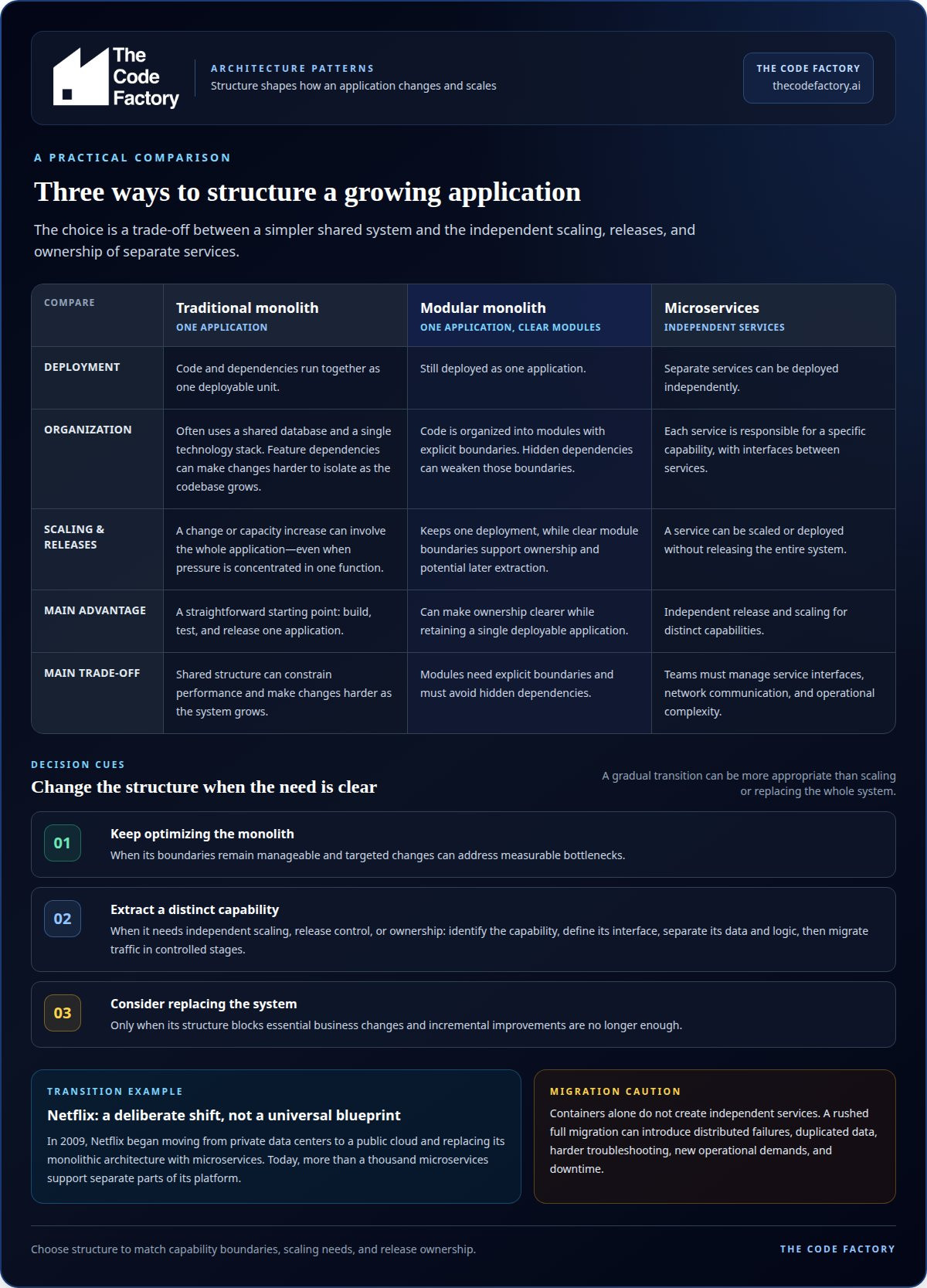
A monolithic architecture packages an application as one deployable unit, with its code and dependencies running together. It commonly uses a shared database and a single technology stack. This structure can simplify early development: a team builds, tests, and releases one application rather than coordinating separate services. As the codebase grows, however, dependencies between features can make changes harder to isolate.
Microservices divide an application into independent services, each responsible for a specific capability. Teams can deploy or scale one service without releasing the entire system, but must manage service interfaces, network communication, and operational complexity. A modular monolith offers a middle path: it remains one deployable application while organizing code into modules with explicit boundaries. Those boundaries support clearer ownership and later extraction, provided modules avoid hidden dependencies.
Netflix began moving from private data centers to a public cloud and replacing its monolithic architecture with microservices in 2009. Today, more than a thousand microservices support separate parts of its platform. That example illustrates a deliberate architectural transition, not a universal instruction to copy Netflix’s design. A smaller product with tightly connected features may benefit more from a well-structured monolith.
Decomposing a monolith starts with identifying a business capability that can function independently. Teams then define its interface, separate its data and logic, and migrate traffic in controlled stages. Containerizing the existing application can support deployment, but containers alone do not create independent services. A rushed full migration can introduce distributed failures, duplicated data, harder troubleshooting, and new operational demands. Poorly coordinated releases and data transitions can also cause downtime.
Optimize a growing monolith while its boundaries remain manageable and targeted changes can address measurable bottlenecks. Split out a service when a distinct capability needs independent scaling, release control, or ownership. Replace the system only when its structure blocks essential business changes and incremental improvements are no longer enough.
Monoliths can blur team ownership because shared code and dependencies let one team’s change affect another team’s work. Parallel development becomes difficult when teams modify the same modules or coordinate whole-application releases, so clear module boundaries and ownership rules matter.
2. What is a Monolithic Application?
A monolithic application runs its functions as one operational system, so a failure can cross feature boundaries. A checkout error, for example, may affect order processing even when those functions serve different purposes. The shared runtime creates a broad failure domain: components aren’t isolated in the same way as independently deployed services.
Consider a memory leak in an image-processing module. If that module consumes resources needed by the rest of the application, the entire system can become unavailable. Tight coupling makes containment harder because components share runtime resources and may rely on one another’s code. Failure isolation therefore depends on the application’s internal boundaries and error handling.
Updates carry similar risks. A change to one function can affect others, so teams often need to test and deploy the complete application. A failed release may require rolling back the whole version rather than reverting one isolated feature. For example, a major shopping application update could take several hours because testing and safety checks must cover the system.
As release cycles become more complex, deployments can slow and downtime may affect users during updates. Smaller changes, automated testing, and a controlled release process help limit how much code changes at once. They don’t remove the shared failure domain, but they make problems easier to detect before a release reaches users.
Tight coupling also complicates maintenance: a developer changing one function must understand its dependencies and test the behaviours they might affect. For example, an update to checkout may require regression tests for order confirmation and payment handling. A clear test suite and disciplined release pipeline design can make those deployment cycles more controlled.
3. Monolithic architecture and scaling limits
The main challenges of scaling a monolithic application are shared bottlenecks, whole-system scaling, and limited room to grow vertically. If a shopping service’s search function drives demand, adding compute resources also scales checkout and account features. This can leave capacity idle in lightly used areas while the busiest component remains constrained by its code or database queries.
Vertical scaling adds capacity to the server running the application. It can help when CPU or memory is the limiting factor, but each instance has a maximum size. Approaching 70% utilization on the largest available instance is an indicator to move beyond vertical scaling. Even before that point, a larger server won’t fix slow queries, lock contention, or inefficient algorithms in production.
Database pressure can rise with traffic because monolithic functions often share data stores and compete for connections, reads, and writes. A slow query used by several features can delay unrelated requests. Horizontal scaling is difficult because additional application instances must handle requests consistently, and state held on one server can prevent another instance from responding correctly. Stateless request handling and shared session storage help address this constraint.
Targeted tuning can extend capacity without changing the architecture. Caching frequently read data that changes rarely reduces repeated database work; a load balancer distributes incoming requests across application instances. Read replicas can serve read-only traffic, though replication delay means their data may lag behind the primary database. Sharding divides data among database instances, but application queries and data ownership must account for those partitions.
Choose an intervention based on the measured bottleneck: optimize slow code or queries, cache repeat reads, and distribute stateless requests when application capacity is constrained. A message queue can buffer traffic spikes, allowing background work to run at a sustainable pace. These measures improve scalability, but they don’t make every monolithic component independently scalable. If a specific capability repeatedly needs separate capacity, assess its boundaries and the cost of extracting it.
4. Scaling monolithic applications and infrastructure costs
Scaling a monolith can raise infrastructure costs because a traffic surge in one function may require more compute for the entire application. If product search drives demand, added instances also run checkout and account components. As a result, capacity can sit underused while resources are provisioned across functions that didn’t experience the same traffic increase.
Measure the constrained resource before changing infrastructure. If CPU utilization remains above 80%, adding CPU cores is one option to consider. That step won’t resolve a slow database query or excessive memory use, so production metrics should show whether CPU, memory, storage, or database throughput limits each workload.
Database changes also affect capacity and complexity. Read replicas can take read-only traffic from the primary database, but their data may be delayed. Sharding divides records across database instances to distribute load; queries and application logic must then account for where each record lives. The right decision depends on the bottleneck and data access patterns.
A cost-conscious sequence starts by identifying busy components and their resource use. Optimize inefficient code and queries next, then add capacity only where measurements show a constraint. Review resource use after each change to see whether an adjustment resolved the bottleneck or simply shifted pressure elsewhere. For predictable workloads, right-sizing resources can also avoid provisioning the same high capacity for every application function.
Cloud infrastructure configuration should reflect the application’s actual workload, deployment structure, and scaling strategy. If infrastructure changes are becoming reactive or difficult to control, request cloud infrastructure configuration to align capacity with production needs.
The Code Factory
The Code Factory helps teams assess whether a monolith needs focused remediation, infrastructure changes, or a broader architectural shift. Turn to its engineers when production bottlenecks persist, releases feel increasingly risky, or resource use grows without clear performance gains.
Production readiness reviews examine system risks, while code remediation and optimisation address issues that constrain reliability or performance. Architecture & Scalability consulting helps define a practical path forward, and cloud infrastructure configuration aligns the environment with the application’s needs. The right next step depends on where the system is constrained and whether targeted improvements can meet business demands.
Contact The Code Factory to discuss your application’s scaling constraints and the changes that could address them.
Make the next scaling decision with confidence
The next step is not automatically a larger server or a new architecture. It’s a decision about which constraint matters most to your product, engineering workflow, and operating model. A measured change can preserve what already works while creating room to address the challenges of scaling a monolith application. Set a clear outcome for the next investment, such as steadier production performance, more predictable releases, or better control over resource use.
That outcome gives technical work a business purpose. Use it to guide priorities, evaluate trade-offs, and decide whether focused improvements or a deeper architectural change make sense. The Code Factory supports this assessment through production readiness reviews, code remediation and optimisation, and Architecture & Scalability consulting.
Bring your current constraints and goals into the conversation. Contact The Code Factory to discuss a practical next step, and move forward with a clearer basis for decision-making.
Frequently Asked Questions
What is a monolithic architecture?
A monolithic architecture organizes an application’s functionality within a unified system and release process. For example, an online store may include its catalog, checkout, and account features in one codebase. This design can suit a product with closely related workflows. As requirements change, explicit module boundaries help teams control dependencies and keep a monolith easier to adapt.
Major challenges of monolithic infrastructure for ecommerce: The 7 horsemen of doom?
“The 7 horsemen of doom” isn’t a standard technical classification, but ecommerce teams can watch for seven common pressures: traffic spikes, slow database queries, resource contention, coupled releases, broad failure impact, limited component-level scaling, and rising deployment complexity. For example, a promotion may increase catalog searches and checkout activity together. Monitoring each workload helps identify which constraint is disrupting customer journeys.
What is a Monolithic Application?
A monolithic application is software delivered as a single operational unit, even if its code contains distinct features. A retailer’s platform, for instance, might include product browsing, inventory, and payment handling in one application. The term describes how software is structured and deployed, not what it does. Internal modules can still provide separation, but they don’t become independently released services by themselves.
What are the infrastructure costs of scaling a monolith versus microservices?
There’s no fixed cost comparison: the result depends on workload, resource use, and operational requirements. A monolith may require scaling resources for the full application when only one function is busy. Microservices can let teams allocate capacity by service, but they introduce additional deployment and monitoring needs. Compare actual compute, database, storage, and operations usage against each system’s traffic patterns before choosing.
What are the risks and steps involved in decomposing a monolithic application?
Decomposition risks include breaking dependencies, inconsistent data during migration, service communication failures, and increased operational complexity. Begin by mapping a business capability and its code, data, and consumers. Define its interface, separate responsibilities, and migrate the capability gradually, with testing and monitoring at each stage. A staged approach limits the scope of each change and helps teams detect effects before expanding the migration.
