

What if a clean automated scan still leaves your team exposed to fragile architecture or a risky design decision? Automated code quality analysis can surface patterns that are easy to miss across a large codebase, but a finding is a signal to assess, not a verdict. Tools can flag issues such as duplicated code, potential defects, security weaknesses, and dependency risks. They can’t reliably judge every trade-off or understand the full business context.
That distinction matters. Automated checks offer speed and consistency; human code review brings context, design judgment, and the ability to question whether a proposed change is safe. Yet teams can struggle when scans produce too many findings, false positives, or alerts that sit outside the normal remediation workflow. More checks alone won’t create better software. Teams need a disciplined way to assess, prioritize, fix, and verify the issues that matter.
This guide explains how the main analysis methods work, what each can and can’t detect, and how to choose an approach that fits your codebase and delivery process. It also covers how to reduce noise and turn useful findings into prioritized, verifiable engineering work, with human review providing the judgment automation can’t replace.
Key Takeaways
- Use automated code quality analysis at carefully chosen points in the delivery lifecycle, from developer feedback to repository scans.
- Compare static analysis, automated tests, dependency analysis, and human review by the risks each can identify and the limits of its findings.
- Make results actionable by documenting the owner, severity rationale, and remediation decision for meaningful findings.
- Distinguish routine fixes your team can handle from recurring or cross-system issues that may require specialist investigation.
- Use a production readiness review as a complementary assessment when findings point to broader concerns, not as a replacement for routine automated checks.
What automated code quality analysis checks, and what it cannot decide
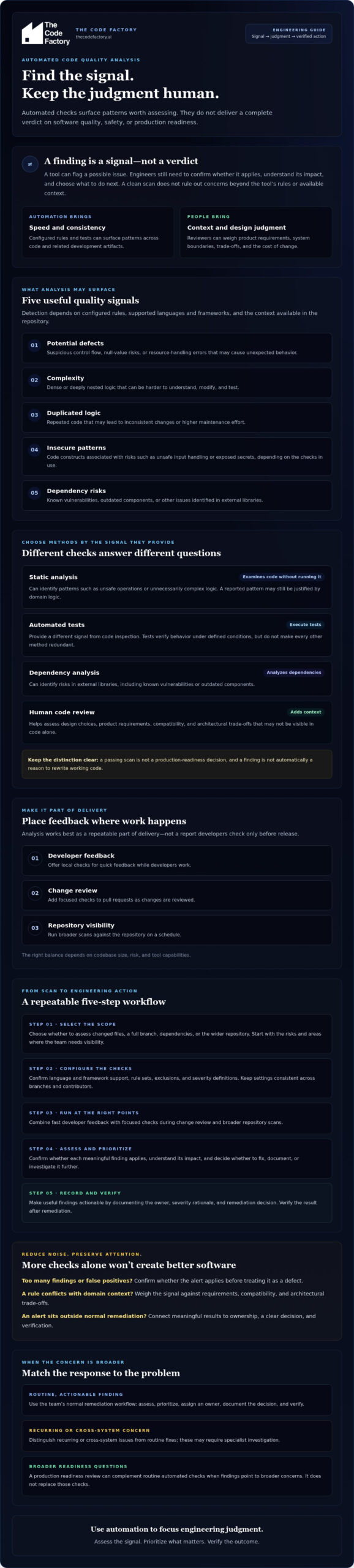
Automated code quality analysis is software-assisted inspection of source code and related development artifacts that applies configured rules or tests to surface potential defects, security weaknesses, maintainability concerns, and dependency risks. It provides evidence for engineers to assess; it does not deliver a complete judgment of software quality.
Many tools use static program analysis to examine code without running it, identifying patterns such as unsafe operations or unnecessarily complex logic. Other checks analyze dependencies or execute tests. Each method measures a different signal, and none can establish on its own that a system is maintainable, secure, or ready for production.
Which quality signals can automated analysis surface?
These categories are related, but they aren’t interchangeable:
- Potential defects: suspicious control flow, null-value risks, or resource-handling errors that may cause unexpected behavior.
- Complexity: dense or deeply nested logic that can be harder to understand, modify, and test.
- Duplicated logic: repeated code that may lead to inconsistent changes or higher maintenance effort.
- Insecure patterns: code constructs associated with risks such as unsafe input handling or exposed secrets, depending on the checks in use.
- Dependency risks: known vulnerabilities, outdated components, or other issues identified in external libraries.
What a tool can detect depends on its configured rules, the languages and frameworks it supports, and the context available in the repository. An alert is a prompt to investigate, not proof that a defect exists. For example, reported complexity may be justified by domain logic, while an unreported issue may fall outside the tool’s rules.
Where do automated checks need human judgment?
Automation can assess whether code matches a rule; it can’t always determine whether the rule fits the product. A design that appears more complex may be necessary to meet a domain-specific requirement, preserve compatibility, or manage an architectural trade-off. Those constraints may not be visible in the code alone.
A passing scan isn’t a production-readiness decision, and a finding isn’t automatically a reason to rewrite working code. Engineers must weigh the signal against system boundaries, product requirements, operational risks, and the cost of change. Code review provides context, while testing verifies behavior under defined conditions. Both complement automated checks, but neither makes every other method redundant.
Use the results as a structured starting point: confirm whether a finding applies, understand its impact, then decide whether to fix, document, or investigate it further. Automated code quality analysis is most useful when it directs engineering judgment through a repeatable process, rather than trying to replace that judgment.
How automated code quality analysis fits into the software delivery lifecycle
Analysis works best as a repeatable part of delivery, not as a report developers check only before release. Teams can start with quick local feedback, add focused checks to pull requests, and run broader scans against the repository on a schedule. The right balance depends on codebase size, risk, and tool capabilities. The Carnegie Mellon University Software Engineering Institute describes continuous integration as part of the software delivery lifecycle, where automated checks can provide feedback as changes are integrated.
A practical workflow for automated code quality analysis moves from setup to verified action:
- 1. Select the scope. Decide whether to assess changed files, a full branch, dependencies, or the wider repository. Start with the risks and areas where the team needs visibility.
- 2. Configure the checks. Confirm language and framework support, rule sets, exclusions, and severity definitions. Keep settings consistent across branches and contributors so a finding means the same thing in each environment.
- 3. Run analysis at the right points. Offer local checks for fast developer feedback, run relevant checks on pull requests, and schedule repository-wide scans to catch issues outside changed code.
- 4. Review the result. Inspect the affected code and the rule explanation. If behavior is uncertain, run or add a relevant test instead of treating the alert as confirmed.
- 5. Record and verify the decision. Assign meaningful findings an owner and a decision, such as fix, defer with rationale, or investigate further. Rerun checks after changes to confirm the result.
From code change to actionable finding
Depending on team needs and tool configuration, a check may focus on a pull request or analyze a broader repository. A useful result identifies the code location and rule, may include severity, and provides enough remediation context to guide investigation. Developers still need to inspect the surrounding code and reproduce relevant behavior where possible. That helps distinguish a real issue from a rule that doesn’t fit the case.
Connecting checks to CI/CD without blocking blindly
Checks can be added to existing build and review workflows, but confirm each tool’s integrations, supported scans, and configuration options before designing the process around them. Decide in advance which results should produce a warning, require review, or block a merge or release. Apply gates selectively and assess their effect. A noisy or misconfigured gate can slow delivery without improving risk control. Teams refining this process can also consult guidance on securing CI/CD pipelines.
Consistent rules and clear ownership turn scan output into a dependable workflow. If findings point to production-readiness concerns or changes that span systems, a production readiness review may help assess broader risks alongside routine automated checks.
How to compare automated code quality analysis methods and tools
Choose an analysis method based on the risks you need to manage and the languages, frameworks, and repository context your team uses. No single check answers every quality question. Static analysis, tests, dependency analysis, and human review examine different evidence, so compare them by purpose and workflow fit rather than treating them as interchangeable products.
Static analysis, testing, and dependency checks are not interchangeable
Static analysis inspects code without relying on executing every possible program path. Automated tests run selected scenarios to check expected behavior, while dependency analysis examines external components for issues such as known vulnerabilities. Human review brings context to implementation choices that tools may not understand. Used together, these methods broaden the evidence available to a team, but they can’t guarantee that every defect will be found.
| Method | Primary signal | Workflow fit | Important limitation |
|---|---|---|---|
| Static analysis | Code patterns, potential defects, complexity, or insecure constructs | Local feedback, pull requests, or repository scans | Rules may miss issues or flag acceptable code; coverage depends on configuration and supported languages. |
| Automated tests | Whether specified behavior passes under defined conditions | Local development and build or pull-request checks | Tests cover only the cases written and run; passing results don’t prove all behavior is correct. |
| Dependency analysis | Risks associated with external components | Pull-request checks and ongoing repository monitoring | Findings need validation against the components and versions actually in use. |
| Human review | Design, context, and suitability of a change | Code review before integration or release | Review quality depends on available context and reviewer judgment. |
Which criteria should guide tool selection?
Start with language and framework coverage, then test how well a tool fits the team’s development and CI/CD workflow. Assess rule configurability, finding explanations, integration effort, and how results can be triaged. For enterprise repositories, review data handling, access controls, and governance requirements before enabling scans. A tool that identifies an issue but can’t explain its location or rationale may create more investigation work than value.
Products such as CodeQL and Semgrep can be evaluated as examples, not assumed equivalents. When partnering with The Code Factory, you can confirm each product’s current language support, capabilities, deployment options, and licensing against your requirements. A Google Research study examines developers’ needs and motivations when using static analysis tools, offering useful context for teams looking to reduce noise and turn analysis results into engineering action.
Before a broad rollout, pilot the shortlisted approaches on representative code from your own repository. Compare useful findings, irrelevant alerts, setup effort, and how readily engineers can act on the results. The best fit is the one that supports your risk priorities and delivery process, not a universal ranking.
How to reduce noise and turn analysis results into engineering action
A large alert count can create the appearance of control while making important risks harder to see. If findings remain unreviewed or repeatedly prove irrelevant, developers may stop trusting the tool. Automated code quality analysis becomes more useful when each meaningful result has a clear triage decision, an accountable owner, and a way to verify what happens next.
Triage findings by impact, confidence, and exposure
Start by distinguishing confirmed defects from suspected issues and policy violations. A confirmed defect has evidence of incorrect behavior; a suspected issue needs investigation; a policy violation may require action even if no failure has been observed. Then weigh potential impact, confidence in the finding, exploitability, affected code paths, and product or business context. A severe alert in reachable, sensitive functionality may deserve attention before a low-confidence warning in unused code.
For each finding the team decides to address or defer, record:
- Owner: the person or team responsible for the next action.
- Severity rationale: the likely impact and why the finding has its current priority.
- Remediation decision: fix, investigate, or accept as an exception, with a reason.
- Review point: when a deferred issue or accepted exception will be reconsidered.
Legacy repositories often begin with findings that can’t all be fixed at once. A baseline can help teams focus on new or changed issues, but it must not turn unresolved work into “fixed” work. Keep the existing backlog visible, assign ownership where risk warrants it, and revisit deferred findings when affected code changes or the system’s exposure shifts.
Verify remediation and improve the signal over time
After a fix, rerun the relevant analysis and tests. Confirm that the finding is resolved and that the change hasn’t introduced a related problem. Closing an alert without verification weakens the record and makes future triage less reliable.
Look for patterns across recurring findings. Repeated warnings in the same component may point to shared design constraints, unclear coding conventions, or a process weakness rather than isolated mistakes. Tune rules based on reviewed evidence and assess the effect of configuration changes. Broadly suppressing a noisy rule can also hide meaningful cases; targeted exclusions with documented rationale are safer.
If repeated findings reveal cross-system risks or remediation that needs architectural context, discuss code remediation and optimisation with The Code Factory. A production readiness review can complement ongoing checks when the concern extends beyond individual alerts.
When automated code quality analysis calls for expert remediation
A single finding may call for a focused fix. A pattern of findings can point to a deeper problem. Automated code quality analysis warrants broader investigation when recurring alerts affect multiple services, critical application paths, or the same architectural boundary. In those cases, fixing each reported line independently may leave the underlying risk intact.
Signals that a codebase needs more than routine fixes
Look beyond the alert count. Repeated high-impact findings across services, security concerns that persist after local changes, and performance or maintainability issues that keep resurfacing may indicate shared debt. Similar weaknesses in several services, for example, might reflect a common design constraint rather than unrelated coding mistakes.
Routine, well-understood changes can usually stay with the team that owns the code. Escalate when a proposed fix affects service boundaries, deployment assumptions, shared infrastructure, or several teams’ responsibilities. Review the architecture and deployment context before prescribing remediation; a rule-level correction may not address a risk that depends on how components interact in production.
From analysis report to production-focused remediation
A useful handoff gives whoever investigates the issue enough context to make and verify a sound decision. Include:
- Findings: the relevant alerts, affected components, and recurring patterns.
- Evidence: reproduction details, test results, or conditions that help confirm impact.
- Business context: affected user journeys, operational dependencies, and why the issue matters.
- Ownership: the team responsible for investigation and scope decisions.
- Verification criteria: the checks, tests, or review that will demonstrate the risk has been addressed.
This process separates remediation from suppression. Close a finding when evidence supports that decision, not simply because it has disappeared from a report. Teams evaluating external support can use an AI code remediation services buying guide to clarify questions about scope and approach.
When release confidence is the central concern, a production readiness review can complement routine checks by assessing broader production risks. The Code Factory provides code remediation and optimisation, production readiness reviews, architecture and scalability consulting, cloud infrastructure configuration, and security hardening for engineering challenges that extend beyond isolated rule fixes.
If analysis has surfaced complex, cross-system risks, discuss code remediation and production readiness needs with The Code Factory to explore a practical path from findings to verified engineering improvements.
Turn quality signals into dependable engineering progress
Automated code quality analysis gives teams a consistent way to surface potential defects, complexity, security concerns, and dependency risks. Its findings are signals, not final judgments. Testing, code review, and knowledge of the product remain essential to deciding what matters and verifying the fix.
A reliable process connects checks to the delivery workflow, evaluates methods against the codebase and team’s needs, and gives meaningful findings an owner, a reasoned priority, and a clear remediation decision. When issues repeat across systems or point to architectural, security, or scalability concerns, isolated fixes may not be enough. Those patterns call for investigation grounded in the system’s production context.
The Code Factory provides code remediation and optimisation, production readiness reviews, and architecture and scalability consulting, alongside cloud configuration and security hardening expertise. These services can help address engineering risks that extend beyond routine alert triage. Discuss complex code quality and remediation challenges with The Code Factory.
With disciplined checks and informed engineering judgment, your team can turn findings into practical progress and build software with greater confidence.
Frequently Asked Questions
What is automated code quality analysis?
Automated code quality analysis uses software to inspect source code and related development artifacts against configured rules or tests. It can surface potential defects, complexity, insecure patterns, and dependency risks, then provide findings for engineers to assess. The analysis is a repeatable source of technical signals, not a complete judgment of maintainability or production readiness. Its coverage depends on the tools, rules, languages, frameworks, and repository context configured for the project.
What does automated code quality analysis detect?
Depending on its methods and configuration, automated code quality analysis can flag suspicious code patterns, complex or duplicated logic, insecure constructs, and risks in external dependencies. Automated tests can also identify failures in the behaviors they exercise. Each finding needs context: a warning may be a false positive or an acceptable trade-off, while issues outside configured rules may go undetected. Treat results as prompts to investigate, not a complete inventory of software risk.
Is automated code quality analysis the same as code review?
No. Automated analysis applies configured checks consistently and can scan code for patterns or run defined tests. Human code review evaluates a change in context, including design trade-offs, domain requirements, and effects on other system components. The methods complement each other: automation helps direct attention to measurable signals, while reviewers judge whether the change is appropriate for the product. Neither method alone can establish that every behavior or architectural decision is sound.
Can automated code quality analysis run in a CI/CD pipeline?
Yes, many teams configure supported analysis checks to run during builds or pull-request reviews, but available integrations and capabilities vary by tool. Before adopting one, verify that it supports the project’s languages, repository setup, and CI/CD environment. Decide which findings should produce a warning, require review, or block a merge or release. Start with targeted checks and assess their usefulness before making them release gates.
How do teams reduce false positives in automated code analysis?
Teams reduce noise by reviewing findings against the affected code, confirming whether the reported condition applies, and tuning rules based on evidence. Separate confirmed defects from suspected issues and policy violations, then document the rationale for accepted exceptions or exclusions. For a legacy codebase, a baseline can help focus attention on new findings, but deferred issues should remain visible, owned, and subject to review rather than being treated as resolved.
Does automated code quality analysis make software production-ready?
No. A clean scan only shows that the configured checks did not report issues within their scope. It doesn’t prove that the system meets its performance, reliability, security, or operational needs in production. Teams should interpret analysis alongside testing, code review, architecture, deployment, and business context. A production readiness review can provide a complementary assessment of broader risks, but it doesn’t replace routine automated checks or ongoing engineering ownership.
When should a company seek expert code remediation?
Consider expert remediation when findings recur across services, affect critical application paths, or resist fixes confined to individual code changes. Persistent security, performance, or maintainability concerns may point to architectural or cross-system causes that require wider investigation. The Code Factory provides code remediation and optimisation, production readiness reviews, architecture and scalability consulting, cloud infrastructure configuration, and security hardening. These services can address issues that extend beyond routine team-owned fixes.
