


What if a release passes its tests but fails in production because someone missed a configuration value, dependency, or recovery step? Deployments involve many moving parts, and steps can vary between people or get overlooked under pressure. A production deployment checklist turns readiness from a memory exercise into a repeatable process.
This guide lays out practical checks to adapt to your release process, from validating the build and pipeline to confirming production configuration, dependencies, security, and capacity. It also explains how to set go/no-go criteria, assign accountable owners, and define rollback triggers before launch. After deployment, you’ll know what to monitor, how to assess service health, and how to capture lessons for the next release. The result is a more controlled path to production, with a recovery plan ready if a change doesn’t behave as expected.
Key Takeaways
- Use a production deployment checklist for release execution, and distinguish it from a broader production-readiness assessment.
- Confirm the release artifact is traceable and unchanged, then verify environment configuration, dependencies, and secret controls.
- Review pipeline permissions, approvals, audit records, and infrastructure changes before applying them to production.
- Follow an ordered runbook with a named operator, clear verification steps, and a second reviewer for high-risk changes.
- Set rollback triggers and decision ownership in advance, and check that recovery won’t leave data or systems in an unsafe state.
Production deployment checklist: define release scope and go/no-go criteria
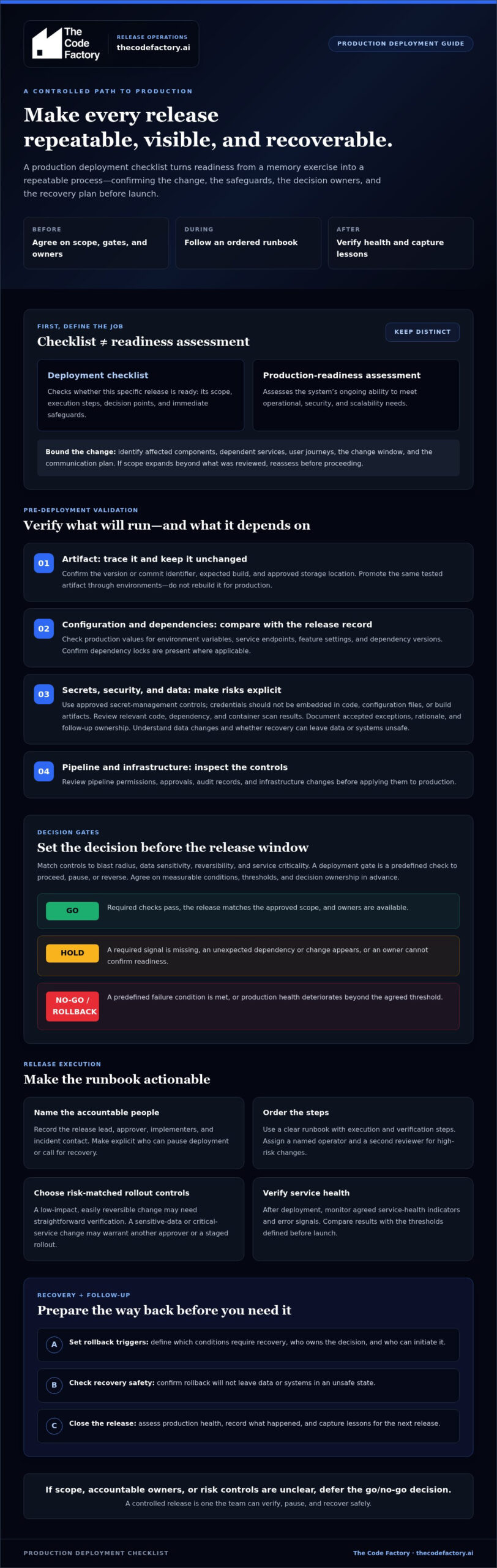
A deployment checklist verifies that a specific release is ready to deploy and can operate safely in production. A production deployment checklist covers the change being released: its scope, execution steps, decision points, and immediate safeguards. A broader production-readiness assessment examines the system’s ongoing ability to meet operational, security, and scalability needs. Both are useful, but they answer different questions.
Start by identifying what is changing and who or what could be affected. A change to a shared authentication service, for example, may affect several applications and user journeys even if the code change looks small. Map those connections before the release window, and place the deployment in the wider software release lifecycle. The goal is a specific release decision, not extra process for its own sake.
Set release ownership, scope, and change boundaries
Name a release lead, approver, implementers, and incident contact. Record the components changing, dependent services, affected user journeys, planned change window, and communication plan. Make decision authority explicit. Everyone should know who can pause the deployment or call for recovery, without having to settle ownership during an incident.
Keep the scope bounded. If the release expands beyond the reviewed change, reassess its impact and readiness before proceeding.
Choose deployment gates that match release risk
Assess blast radius, data sensitivity, reversibility, and service criticality to decide which controls are needed. A low-impact, easily reversible change may need a straightforward verification. A change affecting sensitive data or a critical service may warrant another approver or a staged rollout. Each gate should address a specific risk rather than add delay without improving the decision.
A deployment gate is a predefined check that determines whether a release may proceed, must pause, or should be reversed. Set measurable conditions before the release window. Specify which test results, error signals, or service-health indicators must pass, what warrants a hold, and which conditions trigger rollback. Agree on thresholds and decision ownership in advance so the team can respond consistently under pressure.
- Go: Required checks pass, the release matches the approved scope, and owners are available.
- Hold: A required signal is missing, an unexpected dependency or change appears, or an owner cannot confirm readiness.
- No-go or rollback: A predefined failure condition is met, or production health deteriorates beyond the agreed threshold.
These criteria make approval an operational decision based on evidence. If the release scope, accountable owners, or risk controls remain unclear, defer the go/no-go decision until they’re resolved.
Validate the build, configuration, security, and data before deployment
A release can have an approved scope and still fail because production receives a different build, an unexpected configuration value, or a migration that can’t be safely reversed. Use this part of the production deployment checklist to confirm that the release candidate is the one that will run, and that its runtime requirements and data changes are understood.
Verify artifacts, configuration, and dependencies
Confirm the artifact has a traceable version or commit identifier, came from the expected build, and is stored in the approved location. Promote that same artifact through environments instead of rebuilding it for production. Production should receive the exact artifact that passed testing, not a rebuilt approximation. This preserves a clear link between test results and the code being deployed.
Compare production-specific configuration with approved values. Check required environment variables, service endpoints, feature settings, and dependency versions against the release record. Confirm dependency locks are present where applicable, and verify that credentials come from approved secret-management controls rather than being embedded in code, configuration files, or build artifacts.
Release practices can also include staged exposure and feature controls. LaunchDarkly’s Modern Release Management Checklist offers another perspective on managing a release beyond the build itself.
Check security and data-change safeguards
Review relevant code, dependency, and container security scan results before deployment. A passing pipeline shouldn’t make unresolved findings invisible. Document any accepted exception, its rationale, and the person accountable for follow-up. Block the release if a finding exceeds the team’s agreed risk tolerance or has no clear disposition.
Database changes need a separate review because application rollback alone may not restore the previous state. Check that migrations have been tested against representative data, preserve compatibility with the application versions involved, and run in a safe order. For example, if a release changes how a field is read or written, confirm that older and newer application instances can coexist during the rollout when required.
- Identify whether the change modifies, removes, or transforms production data.
- Confirm backups or other recovery safeguards are appropriate to the data and change risk.
- Document migration dependencies, execution order, and the recovery approach if a step fails.
If artifact, configuration, scan, or migration checks repeatedly expose gaps, production readiness reviews or code remediation can help address underlying release risks.
Check CI/CD, infrastructure, and observability controls for the release
A deployment is only as controlled as the pipeline and production signals around it. Include these controls in the production deployment checklist so the release reaches the intended environment, regressions can be detected, and exposure can be stopped before impact spreads.
Review who can run or approve the pipeline, whether production environments are protected, and whether approval rules match the release risk. Confirm that deployment events and approvals are recorded so the team can establish what changed and who authorized it. Review infrastructure changes before they’re applied, use reproducible definitions where possible, and identify the target environment clearly. Check the planned changes before execution. Even a correct change can cause an incident if applied to the wrong environment.
For more on repeatable pipeline design, see this guide to CI/CD deployment automation.
Match the deployment strategy to application risk
Choose an approach based on the change’s blast radius, service criticality, and recovery requirements. A rolling release replaces running instances incrementally, limiting how much changes at once but requiring old and new versions to work together during the transition. A blue-green release maintains separate production environments and switches traffic from one to the other. That can simplify traffic reversal, but requires managing both environments. A canary release exposes the change to a limited portion of traffic first, then expands only when production evidence supports it.
Each method has operational trade-offs. Consider infrastructure capacity, version compatibility, traffic control, and whether the team can reverse the change cleanly. Don’t choose a strategy by habit alone.
Prove the system can detect a bad release
Before rollout, identify service-level indicators tied to the change and compare them with normal behavior. For a change to a customer checkout flow, relevant signals might include request errors, latency, and successful transaction completion. Make sure dashboards are accessible to the release team, alerts reach the right incident contact, and deployment annotations help correlate a change with a shift in system behavior.
Monitoring is not a safeguard unless someone can act on it. Define which signals require a pause and which require rollback, using thresholds appropriate to the service. Confirm the alert path works and that logs, metrics, and traces provide enough context to investigate a regression. During a staged rollout, use those signals to decide whether to hold, expand exposure, or reverse the release.
Execute the deployment checklist and verify production health
A release plan only works when the team follows it in production. Assign a named operator to run each step, and a second reviewer for high-risk changes. The operator controls execution. The reviewer confirms key decisions, checks the target environment, and helps catch deviations before they reach more users.
Follow a controlled deployment sequence
Immediately before execution, reconfirm approvals, access, required backups or recovery safeguards, and stakeholder communications. Then follow a clear runbook:
- Announce: Notify affected teams that the release is starting and identify the operator and incident contact.
- Deploy: Apply the approved change to the intended environment using the planned rollout method.
- Verify: Check application health and critical user journeys against the release’s acceptance criteria.
- Expand: Continue to the next rollout stage only if health signals remain within agreed limits.
- Close or roll back: Record the outcome, or stop and initiate the documented recovery procedure if a trigger is met.
Pause at each predefined health checkpoint. If a metric breaches its agreed threshold, don’t expand exposure while the team investigates. Record the deployment event, decision, observed anomaly, and follow-up owner. This gives the team a useful release history for incident response and later review.
Validate service behavior and decide whether to continue
After each rollout stage, check more than whether the deployment command completed. Confirm application health, key user workflows, error rates, and the behavior of affected dependencies. Compare these signals with the documented baseline and release acceptance criteria. For a change to account sign-in, for instance, verify that users can authenticate and related services remain healthy. A green infrastructure status alone isn’t enough.
Use logs, metrics, and traces to investigate unusual behavior, then make the decision explicit: continue, hold for investigation, or roll back. Keep the operator and decision-maker aligned, and document why the release advanced or stopped. For releases with complex dependencies or elevated risk, a production readiness review can help surface gaps before execution.
If your team needs support assessing readiness for a high-risk release, learn more about production readiness review support.
Close the release with rollback readiness, ownership, and follow-up
A deployment isn’t complete just because the new version is live. Close the release by confirming production is stable, the recovery path is clear, and any unresolved risk has an owner. A useful production deployment checklist treats recovery and follow-up as part of the release, not as tasks to improvise after a failure.
Make rollback executable before the change goes live
Document who can authorize rollback, who performs it, which communication path they’ll use, and what thresholds trigger the decision. Set any applicable time constraints in advance, based on the service’s operational needs. Where feasible, test the recovery procedure, including access, dependencies, and expected effects on data. A rollback plan that hasn’t been checked may fail when it’s needed most.
Distinguish application rollback from database restoration. Reverting application code may not undo a migration or reverse data already written in a new format. Depending on the change, recovery could require restoring data, rolling forward with a corrective change, or coordinating application and database steps. Verify that the procedure won’t leave partial changes, incompatible versions, or an unsafe system state.
Turn release evidence into operational improvement
Record enough evidence to reconstruct what happened: approvals, artifact identifiers, deployment events, health checks, incidents, decisions, and the final outcome. Note any customer impact and unresolved risk. Assign an accountable owner and due date to every defect or control gap. An observation without follow-up can become a recurring release hazard.
Look for patterns across releases. A one-off issue may call for a focused fix, while repeated failures in pipeline permissions, security checks, infrastructure changes, or recovery procedures can point to a deeper engineering problem. Review the underlying process and system instead of adding checklist steps that don’t address the cause.
For recurring pipeline or security gaps, consider a focused engineering review of CI/CD security, alongside appropriate code remediation or infrastructure work. The goal is a release process that captures evidence, assigns clear ownership, and gets safer with each deployment.
Make safer releases part of the operating rhythm
A reliable release is more than a successful deployment. It starts with clear scope and decision criteria, carries the tested build through controlled pipeline and production checks, and ends with recovery ownership and useful follow-up. A production deployment checklist makes those practices repeatable, helping teams act on evidence instead of improvising under pressure.
Use the checklist as a working control, not a static document. Adapt it to the risks of each change, make owners and rollback decisions explicit, and turn recurring gaps into focused engineering improvements. That discipline helps protect service stability while giving teams a clearer basis for moving forward.
For releases with complex readiness or remediation needs, The Code Factory provides production readiness reviews and code remediation, along with cloud infrastructure configuration, security hardening, and CI/CD deployment pipeline implementation. Discuss production readiness and deployment risks with The Code Factory.
With clear checks and accountable owners in place, your team can release with greater confidence and keep improving with every deployment.
Frequently Asked Questions
What should a production deployment checklist include?
A production deployment checklist should cover release scope, accountable owners, go/no-go criteria, the tested artifact, configuration, dependencies, security checks, data changes, and pipeline controls. It should also specify the deployment sequence, production health signals, rollback triggers, and how decisions and outcomes will be recorded. Tailor checks to the change’s risk so the list guides action instead of becoming a routine approval exercise.
How do you create a production deployment checklist for a software release?
Build the checklist around the change, its dependencies, and the production services or user journeys it could affect. Name the release lead, approver, operator, and incident contact, then define measurable pass, hold, and rollback criteria before deployment. Add artifact, configuration, security, data, infrastructure, and monitoring checks. The production deployment checklist should reflect the team’s actual pipeline and recovery method, and be reviewed after releases to address gaps.
Is a production deployment checklist different from a production readiness review?
Yes. A deployment checklist focuses on a specific release: whether its artifact, approvals, execution steps, verification, and recovery plan are ready. A production readiness review examines broader operational concerns, such as security, scalability, infrastructure, and ongoing service reliability. A team may use both: the review can surface system-level work, while the checklist confirms that a particular change can proceed safely.
What should you check immediately after deploying to production?
First, confirm the deployment completed in the intended environment and that the application is healthy. Test the critical user journeys affected by the change, then compare error rates, latency, and relevant service indicators with the expected baseline. Check dependent services and review logs, metrics, and traces for unexpected behavior. Keep rollout exposure limited until the agreed health checks pass, and record anomalies or decisions as they occur.
When should a team roll back a production deployment?
Roll back when a predefined trigger indicates unacceptable service impact, such as a sustained breach of an agreed health threshold, failure in a critical user journey, or an unexpected data-integrity or security issue. The decision-maker and operator should follow the documented recovery procedure and communication path. Before reverting, confirm the action won’t worsen data or dependency compatibility. Some migrations may require restoration or a forward fix instead.
Can you use the same deployment checklist for every application?
Use a shared baseline, but don’t assume every application needs identical release gates. Common checks can cover ownership, artifact traceability, approvals, monitoring, and recovery. Adapt the checklist to each system’s criticality, data sensitivity, dependencies, architecture, and rollback options. A customer-facing service with complex data changes may need different verification from a low-impact internal tool. Review the checklist when the application or its deployment process changes.
How do CI/CD pipelines support a safer production deployment?
CI/CD pipelines make release steps more consistent by automating build, test, and deployment workflows. Controls can verify that the tested artifact is promoted, run code or dependency scans, restrict production permissions, require appropriate approvals, and record deployment activity. Pipelines can also support staged releases and health checks. Automation reduces manual variation, but teams still need clear rollback criteria, accountable decision-makers, and signals that reveal production regressions.
